English
 中文简体
 русский
 Español
[Auto Accessories][email protected]
2026-11-05
At highway speed, a glance at the navigation screen can move a car a foot or more toward the shoulder. Lane keep assist is built for that kind of brief lapse. A forward-facing camera watches the lane markings, the system compares your position with the lane boundary, and it applies a small steering correction or warning when you begin to drift. The short answer: lane keep assist is an active safety aid that nudges the car back toward its lane, but it is not a self-driving feature and it only works within a clear operating window.
Content
Lane keep assist (LKA) is often confused with lane departure warning. The difference is actuation: a warning alerts you, while keep assist intervenes. Lane centering goes further, continuously working to hold the middle of the lane rather than only reacting to a drift. Because names vary by automaker, the owner's manual is the final authority for a specific model.
| Feature | Primary job | What the driver notices | Typical role |
|---|---|---|---|
| Lane departure warning | Monitors markings and alerts when a wheel nears or crosses a line without a turn signal | Chime, vibration, or visual alert | Early warning on highways |
| Lane keep assist | Adds brief steering torque to correct an unintended drift | A gentle tug or resistance, sometimes after an alert | Safety net for brief lapses |
| Lane centering | Continuously adjusts steering to hold lane center, often with adaptive cruise | More sustained steering support; hands still required | Highway comfort |
The practical effect is a safety net, not a chauffeur. Most systems target unintended drift, not deliberate lane changes, and none are designed to steer around potholes, debris, or a sharp bend at speed.
The hardware is simple in principle. A small camera, usually mounted behind the rearview mirror, looks forward through the windshield. Image-processing software identifies lane boundaries, and a control unit compares that geometry with vehicle speed, steering angle, and yaw rate. The sequence is usually:
Some systems add radar, a rear camera, or navigation data, but camera-based lane reading is the core. The intervention usually lasts a fraction of a second and is limited in authority. It can remind a tired driver to steer, but it cannot drive the car.
Lane keep assist operates inside an envelope. Outside that envelope, many systems do not simply perform poorly; they switch off or show a gray icon. The exact thresholds differ by model, so treat these as typical conditions rather than universal rules.
Rain, fog, snow, sun glare, hard shadows, worn paint, roadworks, and snow-covered roads can all reduce reliability. If the camera cannot see a plausible lane, the system has nothing trustworthy to correct against.
From the driver's seat, a correction often feels like a small counter-steer or a brief stiffness in the wheel. Some cars sound a chime or vibrate the seat first; others steer gently and then warn if the drift continues. A lane icon on the instrument cluster usually changes color or state to show whether the system is active, available, or off.
To override it, steer firmly and deliberately, or use the turn signal before changing lanes. Do not fight the wheel with a light touch; the system is designed to yield to clear driver input. Keep both hands on the wheel and treat the feature as a backstop for a moment of inattention, not as permission to look away.
Lane keep assist has blind spots that are easy to forget. It does not reliably see pedestrians, stopped vehicles, potholes, or debris. It may misread old repair lines, shadows, or temporary markings. On sharp curves it can fail to intervene in time, and on narrow roads it may struggle to distinguish the lane edge from the shoulder. A dirty windshield, a cracked camera bracket, or a windshield replacement without recalibration can also cause delayed or biased corrections.
Cold weather brings another limitation: snow and ice can hide the lines entirely. Heavy rain can scatter the camera's view. Direct low sun can wash out contrast. In those conditions, the safest assumption is that the system is unavailable, even if the icon remains on.
The camera also does not replace your eyes or mirrors. A quick shoulder check and properly adjusted side mirrors remain essential for lane changes. For a refresher on mirror visibility, see this guide to how auto side mirrors improve driving safety. If a damaged mirror is limiting your view, the auto side mirror catalog is a separate maintenance fix.
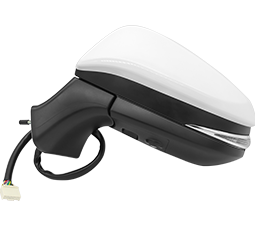 qxp Auto Side Mirror for OEM and AftermarketReplacement side mirrors for many global car models, including wide-angle, heated and signal-integrated options, helping restore rear visibility when a damaged mirror limits your view.View Product →
Lane keep assist is not autonomous driving. Even in a Level 2 system that combines lane centering with adaptive cruise control, the driver must supervise and be ready to take over.
If you are checking a used car, do not rely on the window sticker. Test the feature on a clear, marked road at a safe speed.
Stop testing if traffic, weather, or road conditions make the maneuver unsafe. A parking-lot demonstration will not prove the system works at highway speed.
Lane keep assist works by watching lane markings, estimating the car's path, and briefly steering toward the center when a drift is detected. It is useful on well-marked highways and tiring drives, but its limits are real: weather, roadworks, faded paint, camera obstruction, and sharp curves can all reduce or disable it. The best use is simple. Keep the camera area clean, keep your hands on the wheel, use the turn signal, and treat every correction as a reminder rather than a replacement for attention.


[Auto Accessories][email protected]
[Auto Parts][email protected]

+86-0571-26238568

Kangxin Road, Tangqi Town, Linping District, Hangzhou , Zhejiang , China